




If you have been scrolling through Twitter or YouTube lately, you have seen the same tired promises plastered everywhere. “Buy my blueprint and make $10,000 in twenty-four hours!” I will be completely honest with you—I fell for one of those back in early 2024. I bought the course, I watched the videos at 2x speed, and all I got for my trouble was a massive headache, a significantly lighter wallet, and a lingering suspicion that I had just been played for a sucker.
That experience left a bad taste in my mouth, but it also taught me a crucial lesson. The problem was never artificial intelligence itself; the problem was my expectation that AI would do all the heavy lifting while I sat back and watched Netflix. That is not how any of this works.
The shift I have witnessed heading into 2026 is nothing short of profound. We have moved way past the era of novelty chatbots that write mediocre poetry. We are now in the age of agentic systems, autonomous workflow automation, and coding copilots that can literally architect entire applications from scratch. What used to require a team of ten people five years ago, I can now execute solo from my kitchen table. The barriers have collapsed, but the discipline required to succeed has not.
So, let me drop the pretenses and give you the raw, unfiltered tour of the AI tools that are actually making me money in 2026. I am going to categorize them by how I use them, why I chose them over the competition, and, most importantly, the specific ways they turn into verifiable income.
The Heavy Hitters: My Take on ChatGPT versus Claude
Before I get into the niche stuff, I need to address the gladiator match that everyone asks me about in my DMs. If I had to choose just one AI assistant to run my entire business, which would it be? The answer is complicated, because I actually subscribe to both, and I deploy them like entirely different employees with completely different skill sets.

ChatGPT: My Speed Demon for Marketing and Visuals
OpenAI’s ChatGPT is still my undisputed workhorse when I need things done fast. In 2026, with the GPT-5 architecture humming in the background, this thing is faster, cheaper, and more contextually aware than ever before. I use it when I have a mountain of grunt work to climb.
For example, last week I had to write fifty product descriptions for an e-commerce client who sells organic skincare. With ChatGPT, I fed it the brand voice guidelines, the ingredient lists, and the target keywords, and it spat out fifty unique, saleable descriptions in under forty-five minutes. If I had tried to do that manually, or even with Claude, I would have been there for three days.
But the real game-changer for me has been the native DALL-E integration. I no longer have to jump between three different tabs to create a marketing asset. If I am writing a blog post or a social media thread and I realize I need a custom graphic to break up the text, I just ask ChatGPT to generate it right there in the same conversation. For someone who is not a designer and hates paying for stock photos, this has been a lifesaver. I also lean heavily on the plugin ecosystem. I have connected it directly to my Google Sheets for bulk content generation and linked it with Zapier to automatically publish my drafts to WordPress. It has turned my content workflow into a well-oiled assembly line.
Claude: My Deep-Thinking Architect for Code and Premium Writing
Now, let me talk about Claude, because this is where the magic happens for the high-ticket items. Developed by Anthropic, Claude has really proven itself to me as the undisputed king of deep work. Where ChatGPT sometimes feels like a hyperactive intern who talks a lot but occasionally misses the nuance, Claude feels like a seasoned senior editor who gets what I am trying to say.
If you want to charge premium rates, you need to deliver premium quality. I use Claude to write my long-form e-books, my in-depth SEO pillar posts, and my client white papers. The prose flows with a natural cadence that doesn’t have that stale, robotic “AI smell” that savvy readers can detect from a mile away.
And the coding capabilities? I genuinely did not believe the hype until I tested it myself. Claude Opus 4.6 scored an absurd 80.8 percent on the SWE-bench coding test, and when I used it to rebuild a client’s buggy e-commerce checkout flow, the code was so clean and well-documented that the client’s lead developer actually emailed me asking if I had hired a junior dev. I hadn’t. It was just Claude and me, late at night, with a cup of coffee.
The enormous context window of one million tokens—roughly seven hundred pages of dense text—is my secret weapon for data analysis. I recently did a freelance gig analyzing five years of customer feedback surveys for a SaaS company. I dumped all the raw data into Claude, and it synthesized trends, flagged sentiment shifts, and produced a thirty-page executive summary that the client paid me four figures for. ChatGPT simply cannot handle that level of density without losing the plot.
So, what is my final verdict? I tell my friends this all the time: if you want to make money through volume, speed, visuals, and social media management, you need ChatGPT. But if you want to charge premium fees by delivering flawless code, ghostwritten books, or deeply researched reports that make clients weep with joy, then you absolutely must master Claude. I keep both in my back pocket, and I switch between them like a carpenter switching between a hammer and a screwdriver.
My Go-To Content Creation and Copywriting Tools
I am a writer at heart, so naturally, this is where my toolbox is the most crowded. The demand for high-quality written content is absolutely insane right now, and I have capitalized on it by building a system that allows me to output six times the work of a traditional freelance writer without burning out.
I have been using Jasper for years, and it has evolved so much from the simple blog generator it used to be. Today, it is my heavy lifter for client work that involves repetitive copy. If a client comes to me wanting a month’s worth of email sequences or a hundred different Facebook ad variations, I fire up Jasper. The brand voice customization feature is incredible—I can train it on a client’s previous winning copy, and it replicates that tone almost flawlessly. I do not use it for my flagship, bylined content, but for the grunt work that pays the bills, it allows me to take on retainer clients that I otherwise would have had to turn away.
I know, I know—everyone has Grammarly. But hear me out. In 2026, Grammarly is so much more than a spell checker. I use the premium version, and it analyzes the tone, clarity, and even cultural sensitivity of my emails. When I am sending proposals to international clients, I run everything through Grammarly first. It has saved me from sending incredibly awkward, culturally tone-deaf emails more times than I care to admit. It pays for itself every single month by ensuring I sound like the professional I claim to be.
I am not a coder, but I do build simple landing pages for clients who want a quick web presence. Elementor AI, integrated right into the WordPress builder, has been a lifesaver. I just describe the kind of layout I want in plain English, and it generates the entire section—text, images, and buttons—in seconds. Before Elementor AI, I used to spend hours hunting for the right widget. Now, I can crank out a five-page brochure site in a single afternoon and charge a tidy sum for it.
My Favorite Image and Video Generation Tools
Visual content pays the bills in 2026. If you are not leveraging video and imagery, you are leaving a mountain of cash on the table. I started taking visual content seriously last year, and my income from social media management gigs has more than doubled.
Canva has completely transformed my design workflow. The Magic Studio suite is basically a design assistant that lives inside Canva. I have never been a graphic designer—my Photoshop skills are laughably bad—but with Canva Magic Studio, I can generate professional graphics for my social channels in minutes, not hours. I used to dread creating Pinterest pins and Instagram carousels. Now, I actually look forward to it because the AI generates the layout, suggests the fonts, and even edits the background of my photos with a single click. It has made me look like a design wizard to my clients, and honestly, I am just riding the coattails of the AI.
Short-form video is where the money is right now, and I have been diving deep into InVideo and CapCut AI. These tools allow me to create thirty-second clips for Instagram Reels and YouTube Shorts without ever picking up a camera. I write the script using ChatGPT, plug it into InVideo, pick a template, and let the AI handle the voiceovers and stock footage assembly. I have been posting consistently for a few months now, and the engagement is finally translating into inbound leads for my consulting services. CapCut AI’s auto-captions are also a godsend for accessibility and retention.
This one is a bit scary, but hear me out. HeyGen allows me to create AI-generated video avatars that look and sound like me. Instead of filming myself in front of a camera (which I hate), I use HeyGen to create talking-head videos for my YouTube channel and sales pages. It saves me hours of filming and retakes. I recently ran a test where I sent a HeyGen-generated video pitch to a potential client instead of a cold email, and they booked a call within an hour. It is that effective.
I use Leonardo.ai whenever I need high-end, artistic imagery that Canva and DALL-E just cannot seem to nail. The free tier is generous, and I often use it to generate unique thumbnails for my blog posts. Thumbnails with unique, eye-catching visuals get significantly higher click-through rates, and those extra clicks translate to more ad revenue and affiliate commissions for me.
My Automation and Workflow Toolkit
Here is the secret that separates the casual users from the serious earners: automation. You cannot scale a business if you are manually performing the same admin tasks every single day. I have built a back-end ecosystem that runs on autopilot, and it is the reason I can manage multiple income streams without feeling like I am drowning.
n8n (My Favorite)
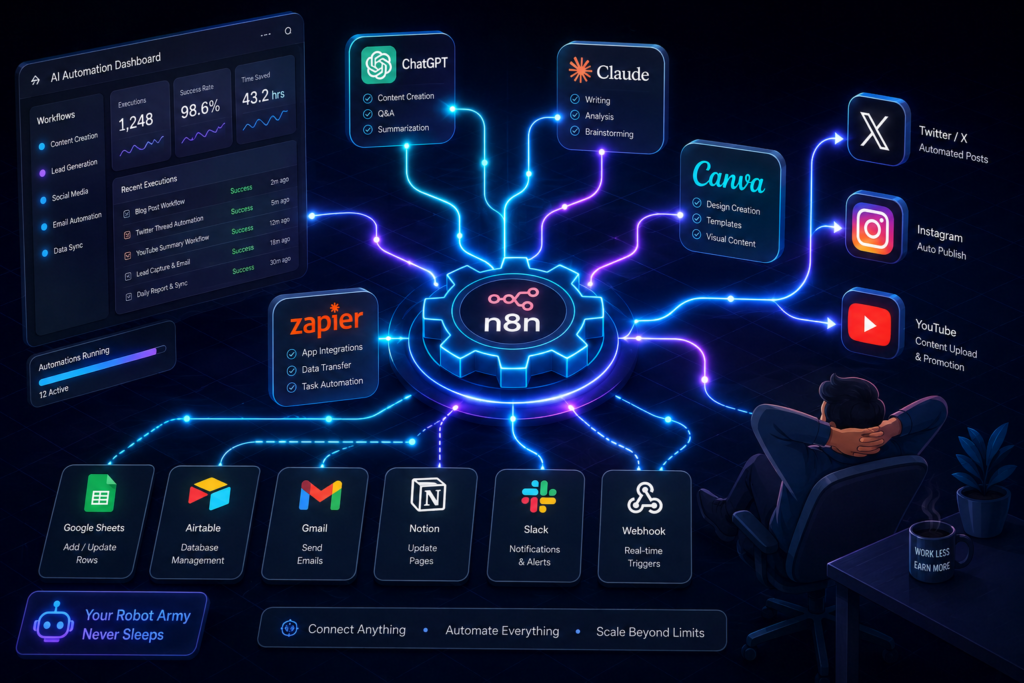
n8n is my absolute favorite automation tool, and it is completely open-source. Unlike Zapier or Make, I have n8n hosted on my own server, which means I am not paying per “task” or “operation.”
Let me give you a real example of how I use it. I have an automation workflow that triggers every time I publish a new blog post on Aiverabase. n8n takes that new post, generates a short summary using Claude’s API, creates a tailored Twitter thread using ChatGPT, generates a unique Instagram carousel image using DALL-E, and then posts all of that content to my social channels automatically. I literally do nothing. It runs in the background while I sleep. This single automation has probably saved me about ten hours of manual social media management every single week, which I now reinvest into creating better content and hunting for new clients.

My Automation and Workflow Toolkit
That n8n workflow I just described? It wasn’t a one-and-done setup. I spent a solid weekend tweaking it, breaking it, and fixing it again. But once I got it humming, I felt like I had unlocked a cheat code for life. I have since built about twelve different automations running on my server. One of them scrapes Reddit threads for questions related to AI tools, feeds them into Claude to draft a thoughtful response, and queues it up for me to review before I post. That single automation has turned me into a “helpful expert” on several subreddits, and I cannot tell you how many freelance clients have slid into my DMs just because they saw a useful comment I left at 3 AM that was actually written by a robot.
Beyond n8n, I also keep Zapier and Make in my back pocket for when I need to connect to platforms that don’t have open APIs. I know they are more expensive, but sometimes you just need a quick, no-code bridge between Gmail and your CRM without spinning up a whole server instance. The secret I have learned about automation is this: do not automate everything at once. Pick one repetitive task that annoys you the most—like sending follow-up emails to cold leads—and automate that. Once you taste that time savings, you will become addicted and start automating everything else.
Another tool I have been playing with recently is Axiom.ai, a browser automation tool that literally clicks buttons and fills out forms on websites for me. I use it to automate the process of submitting my blog posts to different AI directories and social bookmarking sites. It is a bit janky, and sometimes it breaks when a website updates its layout, but when it works, it saves me about two hours of mindless copy-pasting every week. Two hours might not sound like much, but over a year, that is over a hundred hours I get back to spend with my family or work on the high-value stuff.
AI Tutorials – How I Actually Teach This Stuff and Get Paid For It
Let me be real with you for a second. One of the most lucrative things I have done with AI is not just using the tools, but teaching other people how to use them. There is a massive knowledge gap out there. The people who are terrified of AI are the same people who are willing to pay good money to someone who can hold their hand and walk them through it.
I started offering one-on-one AI coaching sessions last year, and I was genuinely surprised by how much demand there was. Business owners, real estate agents, and even local dentists were reaching out to me asking, “Can you just show me how to use ChatGPT to write my emails?” At first, I felt a little guilty charging two hundred dollars an hour for something I considered basic. But then I realized that for these folks, it is not basic. They are busy running their businesses, and they do not have the time to watch hours of YouTube tutorials. They want a human being to walk them through it in plain English.
So, I built a small library of tutorials that I sell as a digital product. I use Loom to record my screen while I walk through specific workflows, and then I package them up into a mini-course. Tools like Guidde are amazing for this because they automatically generate step-by-step documentation based on your screen recordings. I do not have to write the instructions manually; the AI watches what I click and writes the tutorial text for me. It is like having a technical writer following me around all day.
I also write tutorials directly on Aiverabase, of course. My most popular tutorial by far was titled “How I Use Claude to Analyze My Business Financials Without an Accounting Degree.” I literally just walked through my process of dumping my messy CSV bank statements into Claude and asking it to categorize my spending, flag unusual transactions, and calculate my burn rate. That single tutorial brought in more affiliate commissions than I had earned in the previous three months combined, because I linked to the Claude subscription and the tools I used to clean up the CSV files.
The golden rule I have discovered for tutorials is this: never assume your reader knows anything. I always start from absolute zero. I define what a “prompt” is. I explain what a “token” is. I walk them through the exact buttons I click. I have found that beginners appreciate this approach so much that they often become my most loyal readers and highest-paying coaching clients. They trust me because I am not trying to look smart; I am trying to make them smart.
ChatGPT and Prompt Engineering – The Secret Sauce Nobody Talks About
I am going to say something controversial, and I know some of my fellow AI enthusiasts might disagree with me. Prompt engineering is not some mystical dark art that requires a PhD in linguistics. It is just clear communication, and it is the single most profitable skill I have developed in the last two years.
Early on, I was the guy who typed “Write a blog post about dogs” into ChatGPT and then complained when the output was generic trash. I blamed the AI. I blamed OpenAI. I even blamed my keyboard once. But eventually, I had a humbling realization: the problem was not the AI; it was my inability to articulate what I actually wanted. I was giving vague instructions and expecting a miracle.
Now, I treat prompting like I am managing a very smart, very literal intern who has no common sense. I have to give them context, constraints, examples, and a clear definition of success. My prompts have evolved from three words to several paragraphs. I now have a library of prompt templates that I have refined over time, and I reuse them constantly.
For example, my standard prompt for writing SEO blog posts is a beast. It starts with, “You are an expert content strategist with ten years of experience writing for the SaaS industry. I want you to write a 2,000-word article targeting the keyword [X]. Here is the target audience [Y]. Here are the top three competitors we are trying to outrank. Here is a list of the sub-topics I want covered. Please write in a conversational, first-person tone that avoids jargon. Start with a hook that references a common pain point. Include a table comparing at least three tools. End with a section that answers frequently asked questions. Do not use transition words like ‘furthermore’ or ‘moreover’.”
I literally copy and paste that entire block every single time, and I just swap out the variables. The difference in output quality is night and day. ChatGPT stops giving me fluff and starts giving me structured, competitive content that actually ranks. I have one client who pays me a retainer just to write these massive prompt templates for his team. He does not want me to write the content; he just wants me to build the machines that his junior writers will use to produce the content. That is a very niche, very profitable gig that I stumbled into purely because I got good at writing prompts.
Another prompt engineering technique I have been obsessed with in 2026 is “chain-of-thought” prompting. I explicitly ask the AI to think step-by-step and show its reasoning before giving me the final answer. This is especially useful when I am using Claude to debug code or analyze complex data. By forcing the AI to walk through its logic out loud, I can spot errors in its reasoning early on and correct them, rather than receiving a confidently wrong answer that I blindly trust. This has saved me from sending incorrect financial analyses to clients more times than I care to admit.
I have also started using “persona-based” prompting extensively. I will tell ChatGPT to adopt the persona of a seasoned venture capitalist when I am analyzing a startup’s pitch deck, or the persona of a cynical copywriter when I am reviewing ad copy. It is almost like having a panel of experts in my head that I can summon at will. It makes my work more robust and multidimensional, and my clients are consistently impressed by the depth of insight I bring to the table.
Let me give you a specific example of how good prompting put cash in my pocket last month. A client came to me wanting a complete content overhaul of his website. He had been using generic AI to generate his blog posts and his traffic had tanked. I spent an hour crafting a bespoke prompt system for his niche—something I call a “Prompt Pyramid.” The top level defines the overall brand voice and mission. The middle level defines the specific article structure. The bottom level defines the individual sections. I trained his team on this pyramid, and within two weeks, his organic traffic started climbing back up. He was so thrilled that he doubled my retainer on the spot. Good prompting is literally worth its weight in gold.
My Honest Review of AI Tools: Separating the Hype from the Heavy Lifters
I have tested almost every tool under the sun, and I want to save you the time and money I wasted on garbage. There is a lot of noise out there, and distinguishing between a genuine productivity beast and a glorified wrapper around a GPT-3 API is harder than it looks.
Take Synthesia, for example. Everyone raves about it for AI video avatars. I tried it, and while it is cool, it felt too uncanny for my audience. The avatars still look a little too stiff, and I found that HeyGen actually delivered more realistic facial expressions and lip-sync accuracy. That is just my subjective take, but it is why I switched.
Jasper AI versus Rytr? I used Rytr for a while because it is cheaper, but I found myself spending too much time editing the output. Jasper, despite being pricier, gives me content that requires fewer revisions. When you factor in my hourly rate, Jasper actually saves me money because it reduces the editing time. This is a hard lesson for freelancers to learn: the cheapest tool is not always the most cost-effective.
What about the new kids on the block like Perplexity AI? I use Perplexity exclusively for research. It is not a content generator for me; it is a fact-checking and citation machine. When I need to write an authoritative article about a complex topic like quantum computing or the latest FDA drug approvals, I use Perplexity to pull real, verifiable sources. Then I take those sources and feed them into Claude to do the actual writing. This combo has made my content much more credible and backlink-worthy.
And I cannot forget about the audio revolution. I have been using ElevenLabs to generate AI voiceovers for my video content. The voice quality in 2026 is indistinguishable from a real human. I actually had a friend listen to an AI-generated podcast episode I created, and he genuinely thought I had hired a professional voice actor. When I told him it was ElevenLabs, he did not believe me until I showed him the screen. I am now experimenting with turning my blog posts into audio snippets for Spotify and Apple Podcasts. It is a whole new revenue stream that costs me almost nothing to produce.
The One Thing Nobody Tells You About Making Money with AI
I have been rambling about tools for a while, but if I am being completely honest with you, the tools are only twenty percent of the equation. The other eighty percent is grit, adaptability, and genuine problem-solving. I cannot tell you how many people I have seen buy a subscription to ChatGPT, run three prompts, get mediocre results, and then quit, declaring that “AI is overrated.”
They quit because they are looking for a magic wand, not a tool. A power drill is not going to build a house by itself, and ChatGPT is not going to build a business by itself. You have to learn the nuances. You have to iterate. You have to understand the limitations and work around them.
The most successful AI entrepreneurs I know are not the ones with the fanciest tool stacks. They are the ones who obsess over their audience. They ask questions like, “What does my client actually need?” and “Where is the friction in their workflow?” and “How can I use AI to remove that friction?”
I made a mistake early on when I tried to sell “AI consulting.” That is a commodity now. Everyone and their mother is an AI consultant. But when I pivoted and started selling “E-commerce Automation for Small Brands” or “Lead Generation Systems for Real Estate Agents,” suddenly people started paying attention. I was speaking their language. I was not selling them a tool; I was selling them a solution to a pain they already had.
So, my biggest piece of advice to you is to find a specific industry or a specific problem and become the absolute master of using AI to solve that specific thing. If you are a generalist, you will compete on price, and you will lose to someone in a cheaper country. If you are a specialist, you compete on value, and you can charge whatever you want.
Wrapping It Up: My 2026 Game Plan
Looking ahead for the rest of 2026, my strategy is shifting. I am moving away from doing the work myself and moving toward building systems that do the work for me. My n8n automations are getting more complex. My prompt templates are getting more sophisticated. I am investing heavily in learning how to fine-tune open-source models on specific datasets, because I believe the future belongs to hyper-specialized AI agents, not generic chatbots.
I am also doubling down on video. Even though it is uncomfortable for me, the engagement metrics do not lie. Short-form video blows long-form text out of the water in terms of reach. My goal is to build a library of AI-generated video content that funnels people into my e-books and coaching programs. It is a long game, but it is a sustainable one.
At the end of the day, the AI landscape is moving so fast that trying to “master” everything is a fool’s errand. Instead, I am focusing on mastering the workflow—the integration of all these tools into a seamless, automated pipeline. The individual tools will change. ChatGPT might get dethroned next year by some new upstart. But my understanding of how to build workflows, how to automate, and how to create value will never become obsolete.
I hope this brutally honest tour of my digital toolbox gives you some clarity on where to start. Do not buy the expensive courses. Do not fall for the hype. Just pick one problem, pick one tool that can help solve it, and get to work. You will fail a few times, you will get frustrated, but if you stick with it, I promise you there is money to be made.
Now, if you will excuse me, I have an automation script to debug and a cup of coffee that is getting cold. Go out there and build something awesome.
What is the one AI tool you are struggling to learn right now? Drop me a comment or shoot me an email—I might just turn your question into my next tutorial.

Other Articles