




I spent my first year with AI learning in the most inefficient way possible. I jumped between tools, chased every new shiny object, and wasted months on things that did not matter. Then I sat down and mapped out exactly what actually works. Here is the 30-day roadmap I wish someone had given me on day one.
The Problem with Learning AI Today
Let me tell you about my first year with AI. It was chaotic, expensive, and mostly wasted. I started with ChatGPT, got excited, signed up for five other tools, bought three courses I never finished, and spent more time reading about AI than actually using it. I was suffering from what I now call “AI tool fatigue,” the paralysis that comes from having too many options and no clear path forward.
The landscape in 2026 is overwhelming. According to the 2025 Stack Overflow Developer Survey, eighty four percent of developers use or plan to use AI tools, and fifty one percent use them daily. But only twenty nine percent trust AI output to be accurate. That trust gap is the real problem. People are using these tools, but they are not getting reliable results. The difference between reliable results and unreliable ones is almost always the skill of the user.
Here is the honest truth. You do not need to learn every tool. You do not need to understand how the underlying technology works. You need a clear, structured path that builds your skills incrementally, starting with what matters most and adding complexity only when you are ready.
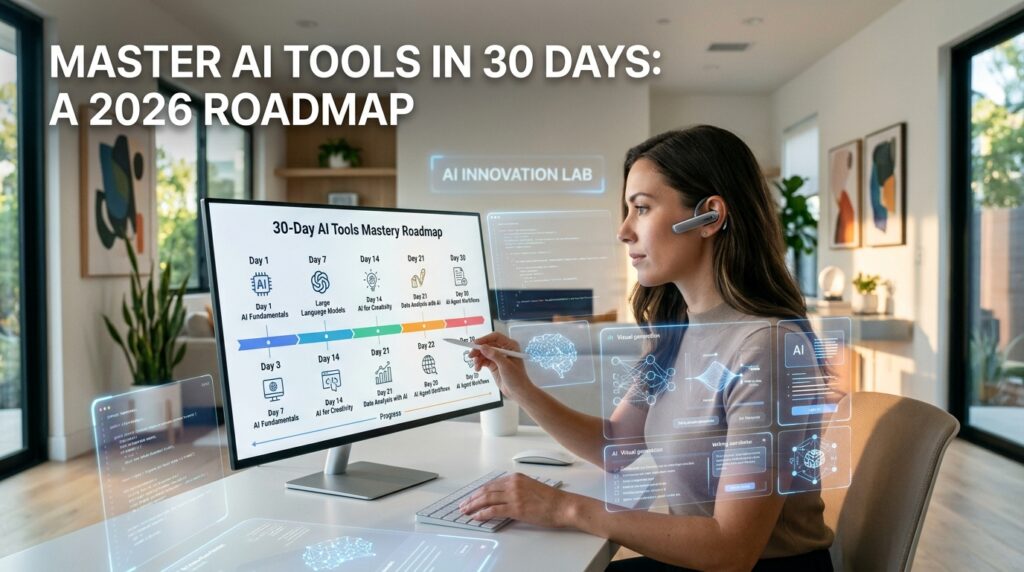
What follows is the 30-day roadmap I designed after hundreds of hours of trial and error. Each week builds on the previous one. Each day has a specific focus. By the end of thirty days, you will not be an expert, but you will be competent. You will know how to use AI tools effectively, how to get reliable results, and how to keep learning as the technology evolves.
The roadmap starts from absolute zero and is designed for anyone with no technical background. It is organized by how you actually learn, with a mix of practice, projects, and structured resources. And it is built around a simple philosophy: you learn AI by using AI, not by reading about it.

Week One: Foundations and Core Tools
The first week is about getting comfortable. You do not need to understand how AI works. You need to understand how to use it.
Day 1: Create Your Accounts and Get Started
Start by creating accounts with the three essential tools. ChatGPT is the most versatile starting point, handling everything from writing and brainstorming to research and analysis. The free tier gives you access to GPT-5.5 with file and image uploads, data analysis, and image creation. Claude is the tool for writing quality and careful reasoning, with a free tier that gives you about fifteen to forty messages every five hours. Perplexity specializes in finding information with verifiable sources, making it invaluable for research.
Spend today just setting up accounts and exploring the interfaces. Do not worry about producing anything important. The goal is to get comfortable with where everything is and what each tool can do.
Day 2: Ask Your First Questions
Open ChatGPT and start asking questions. Ask about things you are curious about. Ask it to explain concepts you have always struggled with. Ask it to help you plan a meal, write a social media post, or summarize an article. The goal is not to produce anything useful. The goal is to understand how the tool responds and how you can refine your requests.
Pay attention to what works and what does not. Notice that vague questions produce vague answers. Notice that specific questions produce specific answers. This is your first lesson in prompting.
Day 3: Master the Art of Conversation
AI tools are conversational. You do not need to get the prompt right on the first try. You can refine your requests based on what you get back. If the first response is not what you wanted, tell the AI what to change. “Make that more formal” or “Shorten that to fifty words” or “Add more detail about the second point.”
Practice this today. Pick a task, ask for it, and then refine the response through conversation. Notice how the AI remembers the context and adjusts based on your feedback. This is the skill that separates effective users from frustrated ones.
Day 4: Compare the Tools
Take the same task and run it through ChatGPT, Claude, and Perplexity. Notice how each tool responds differently. ChatGPT is fast and versatile. Claude is deeper and more nuanced. Perplexity provides sources and citations. Understanding these differences is essential for choosing the right tool for the right job.
For example, ask each tool to summarize a long article. ChatGPT will give you a quick summary. Claude will give you a more thoughtful analysis. Perplexity will find additional sources. Each has its place.
Day 5: Build Your First Workflow
Choose one task you do regularly, like drafting emails, planning content, or researching topics. Use AI to help with that task. Notice where AI speeds you up and where it falls short. This is the beginning of integrating AI into your daily workflow.
By the end of day five, you should feel comfortable using all three tools. You should understand their strengths and weaknesses. You should have a sense of which tool to reach for in different situations.
Day 6: Introduction to Prompt Engineering
Prompt engineering is the skill of giving AI clear, structured instructions. Start paying attention to how you phrase your requests. Notice what produces good results and what produces mediocre ones. Experiment with adding context, specifying the format, and providing examples.
The Google Prompt Engineering Course and CodeSignal’s Prompt Engineering for Everyone are excellent free resources for this stage. The quality of what you put in determines the quality of what comes out. The more precise and intentional your input, the more useful and accurate the result.
Day 7: Reflect and Consolidate
Take today to review what you have learned. What tools do you feel most comfortable with? What tasks have become easier? What questions do you still have? Write down your answers. This reflection will help you focus your learning in week two.

Week Two: Expanding Your Toolkit and Building Skills
Week two is about expanding beyond the core tools and developing practical skills.
Day 8: Visual Content with AI
AI image generation is one of the most accessible and useful capabilities. The latest models in 2026 have become exceptionally good at creating realistic images and images featuring text. Tools like Midjourney, DALL-E, Leonardo AI, and Google’s Nano Banana models are setting new standards for quality.
Start with DALL-E through ChatGPT, which is the most beginner-friendly option. Practice generating images for social media, presentations, or personal projects. Learn the basics of prompt structure for images. A good image prompt includes subject, setting, lighting, style, and composition.
Day 9: Video Content with AI
AI video generation has matured dramatically in 2026. Models now generate synchronized audio, maintain character consistency, and handle complex physics. Platforms like VEED, HeyGen, and InVideo are making video creation accessible to everyone.
Start simple. Generate a short video from a text prompt. Practice repurposing existing content into video format. Notice the difference between text-to-video and image-to-video workflows. Each has different strengths.
Day 10: Audio and Voice with AI
AI voice generation in 2026 is indistinguishable from real humans. Tools like ElevenLabs and HeyGen’s Avatar V create voices with emotional range and natural cadence. This is a game-changer for content creation, narration, and customer service.
Practice creating voiceovers for your content. Experiment with different voices and tones. Notice how voice quality affects the perceived professionalism of your content.
Day 11: Research and Data Analysis with AI
Perplexity and ChatGPT’s data analysis capabilities make research dramatically faster. Practice using AI to gather information, analyze data, and synthesize findings. Ask AI to summarize research papers, analyze spreadsheets, or identify trends in data.
This is where the practical value of AI really shines. Tasks that used to take hours now take minutes. The key is knowing how to frame your research questions and interpret the results.
Day 12: Automation and Workflows
Automation is where AI becomes truly powerful. Tools like n8n, Make, and Zapier let you connect AI to your existing apps. Learn how to create multi-step workflows that handle repetitive tasks automatically.
Start simple. Build a workflow that saves email attachments to a folder. Then build one that generates social media posts from blog content. Then build one that sends you daily summaries of important information. Each step builds your automation skills.
Day 13: Integrating AI into Your Daily Work
By day thirteen, you should have a sense of how AI fits into your workflow. Today, focus on integration. Choose one area of your work, like email management, content creation, or research, and build a system that uses AI throughout.
The goal is not to automate everything. The goal is to identify the specific tasks where AI provides the most value and integrate it seamlessly into your routine.
Day 14: Review and Project Planning
Take today to review week two and plan your learning for week three. What tools have you added? What skills have you developed? What projects could you build with what you have learned?
Choose one project to focus on in week three. It could be a content calendar, a research project, an automated workflow, or anything that combines multiple AI capabilities. This project will be your learning vehicle for the next week.
Week Three: Going Deeper and Building Projects
Week three is about applying your skills to real projects and going deeper into specific areas.
Day 15: Advanced Prompting Techniques
By now, you have learned the basics of prompting. Today, learn advanced techniques like chain-of-thought prompting, which asks the model to walk through its reasoning step by step, and persona layering, which builds prompts that incorporate multiple perspectives.
Practice these techniques with your core tools. Notice how they produce more thoughtful, more accurate results. The difference between basic and advanced prompting is often the difference between acceptable and exceptional outputs.
Day 16: Build Your First AI-Powered Project
Start your project today. Whatever you chose on day fourteen, begin building it. Use all the tools you have learned. Write prompts. Generate content. Create visuals. Build workflows.
The project does not need to be perfect. It needs to be real. The learning comes from the process of building, not from the finished product.
Day 17: Project Day
Continue building your project. When you get stuck, use AI to help you problem-solve. Ask for suggestions. Ask for alternatives. Ask for improvements. The more you use AI as a partner, the better you will get at using it effectively.
This is how you move from being a casual user to being a competent practitioner. You build things. You solve problems. You learn from the process.
Day 18: Introduction to AI Agents
AI agents are the next frontier. Instead of just answering questions, agents can take action, browse the web, fill out forms, write code, and coordinate with other agents. In 2026, we have moved beyond treating prompts like magic spells.
Learn about the frameworks that make this possible. LangChain, LangGraph, and CrewAI are the most established options. Start with a simple agent that can perform a single task. Then build more complex agents that can handle multi-step workflows.
Day 19: Building with AI Agents
Today, build something with an AI agent. It could be a chatbot that answers questions from your documents. It could be an automation that handles customer service inquiries. It could be a research agent that gathers and synthesizes information.
The key insight is that agents are different from chatbots. Chatbots answer questions. Agents take action. The shift from chatbots to agentic engineering is the defining trend of 2026.
Day 20: Evaluation and Iteration
How do you know if your AI systems are working? Today, focus on evaluation. Test your projects. Measure their performance. Identify weaknesses. Improve them.
This is the cycle of effective AI use. Build, test, measure, improve. Repeat. The best AI practitioners are not the ones who get it right the first time. They are the ones who iterate relentlessly.
Day 21: Project Completion and Reflection
Finish your project today. Document what you built and how you built it. Reflect on what you learned. What worked well? What would you do differently? What questions do you still have?
This reflection is essential for consolidating your learning and planning your next steps.

Week Four: Advanced Skills and Future Directions
Week four is about going deeper into advanced areas and preparing for the future.
Day 22: RAG and Vector Databases
RAG, Retrieval-Augmented Generation, is how you connect AI to your own data. Instead of relying on the model’s training data, you give it access to specific documents and databases. This is essential for building AI systems that know your business, your customers, and your domain.
Learn about vector databases, embeddings, and retrieval strategies. Build a simple RAG system that answers questions from your own documents. This is one of the most practical and valuable skills in AI today.
Day 23: Fine-Tuning and Customization
Fine-tuning is how you adapt AI models to your specific needs. Instead of using a generic model, you train it on your specific data. This produces better results for specialized tasks.
Learn the basics of fine-tuning. Understand when it is useful and when it is overkill. Practice with a small dataset. Notice how fine-tuned models perform better on your specific tasks than generic ones.
Day 24: MLOps and LLMOps
Deploying AI systems is different from building them. MLOps and LLMOps are the practices of deploying, monitoring, and maintaining AI systems in production. This is where the real engineering happens.
Learn about the tools and practices of production AI. Understand monitoring, evaluation, and continuous improvement. This is the skill that separates hobbyists from professionals.
Day 25: AI Safety and Ethics
As AI becomes more powerful, safety and ethics become more important. Understand the risks and responsibilities of using AI. Learn about bias, privacy, security, and the broader implications of AI systems.
This is not just about being a good person. It is about being a responsible practitioner. The people who ignore safety and ethics are the people who create problems for everyone else.
Day 26: Emerging Frontiers
AI is evolving fast. Today, explore what is coming next. Multimodal AI that handles text, images, audio, and video together. Agentic systems that can operate autonomously. Open-source models that rival closed-source alternatives.
Staying current is essential in this field. The tools you learn today will evolve tomorrow. The skills you develop, understanding how to learn and adapt, will serve you forever.
Day 27: Building Your Learning System
How will you keep learning after day thirty? Today, build a system for continuous learning. Identify the sources you will follow. Set up alerts for new developments. Schedule time for learning.
The best AI practitioners are not the ones who know the most today. They are the ones who learn fastest. A good learning system is your most important asset.
Day 28: Portfolio and Projects
Document what you have built over the past thirty days. Create a portfolio that showcases your projects and skills. This is essential if you want to use your AI skills professionally.
Include the projects you built in week three. Include the systems you created. Include the problems you solved. Show, do not just tell, what you can do.
Day 29: The Road Ahead
Look back at where you started thirty days ago. Look at where you are now. The progress is probably more than you expected.
Now look forward. Where do you want to go from here? What skills do you want to develop? What projects do you want to build? What problems do you want to solve?
Day 30: Celebrate and Commit
Celebrate what you have accomplished. Thirty days of focused learning is significant. You have gone from absolute beginner to competent practitioner. You have built projects, developed skills, and created systems.
Now commit to continuing. The thirty-day roadmap is just the beginning. The real journey is the one you take from here.
Resources for Your Journey
Throughout this roadmap, I have mentioned various resources. Here is a consolidated list of the most valuable ones.
Core tools to start with:
- ChatGPT: The most versatile starting point
- Claude: Best for writing quality and careful reasoning
- Perplexity: Best for research with verifiable sources
Learning platforms:
- Coursera’s AI Learning Roadmap provides a structured path from basics to expert
- DeepLearning.AI offers short courses on cutting-edge topics
- GitHub’s AI learning roadmaps offer free, structured learning paths
Prompt engineering:
- CodeSignal’s Prompt Engineering for Everyone
- The Google Prompt Engineering Course
- The Prompt Engineering Deep Dive on GitHub
Agent frameworks:
- LangChain and LangGraph for production-grade control
- CrewAI for rapid multi-agent prototyping
- n8n for workflow automation
Conclusion
Mastering AI tools in 2026 is not about knowing everything. It is about knowing enough to be effective and having a system for learning more. The thirty-day roadmap I have shared with you is a starting point, not an ending point.
The tools are changing fast. The models are getting better. The applications are expanding. But the fundamental skills, clear communication, structured thinking, iterative improvement, and continuous learning, will serve you forever.
Start where you are. Use what you have. Learn what you need. The journey of mastering AI is not a destination. It is a practice. And the best time to start is right now.
Go build something amazing.
What day of the roadmap are you most excited to start? Drop me a comment or shoot me an email. I would genuinely love to hear about your journey.

Other Articles

Prompt Engineering for Beginners: 2026 Crash Course
AI Prompt Engineering Tutorial for Beginners